
Defender for Office 365 is getting a new toggle you can turn on for Safe Attachments that will auto-quarantine emails when they come in with a password-protected attachment Defender can't actually scan or detonate. Right now, if it can't see the file's contents, it lets it through by default. This closes that gap. Rollout of the feature will begin as early as August 2026 and continue through the end of October 2026, depending on your tenant type (commercial, GCC, etc.).
As for how it actually works, it's off by default, so you would have to opt into it in your Safe Attachments policy. You could even test it out first on a smaller-scoped policy before rolling it out everywhere. Once it's on, any password-protected attachment that can't be scanned gets quarantined. From there, either the end user can release it themselves by entering the attachment password (it will run a quick just-in-time detonation check before releasing it), or an admin can release it without needing the password at all. It covers common file types like ZIP, GZIP, 7z, RAR, PDF, and Office docs, and you can exclude specific file categories if you don't want them included.
Microsoft is rolling out a third generation of file sharing across SharePoint, OneDrive, and Microsoft 365, built around a new concept called the "hero link." This is a single primary sharing link for each file or folder whose access settings can be adjusted even after it has been shared. Whether a user copies a link, shares through email, or uses the browser URL, they interact with the same primary link. By default, the hero link is scoped to "Only people added to the file," meaning the link itself grants no access unless recipients have been explicitly added. Where organizational policy allows, users can share it with the organization or with anyone via the link. Changing the audience updates the existing link rather than generating a new URL, eliminating the need to redistribute links as access requirements change. Existing sharing links will continue to work and will appear under "Other links" in the sharing dialog.
This is one of the most practical improvements Microsoft has made to file sharing in recent years. Users face less confusion around multiple links, and administrators have fewer duplicate links to troubleshoot. Rollout is scheduled for late August 2026 through late October 2026 across Worldwide, GCC, GCC High, and DoD environments. No action is required before deployment, but it is worth reviewing end-user sharing guidance and updating internal documentation beforehand. Administrators can configure the default hero link audience at the SharePoint site collection or OneDrive level using the DefaultMainLinkScope PowerShell parameter, though no tenant-wide equivalent exists yet. For organizations that want help validating configurations, assessing governance implications, or preparing end-user communications, AdaptivEdge can provide guidance and deployment support.
This feature introduces advanced governance controls that enable administrators to centrally define authentication and access policies for agents at the environment or environment group level within the Power Platform admin center. These controls are designed to standardize how agents handle identity and access across the organization.
Starting in late July, SharePoint page designers can configure the Button web part to launch a Copilot prompt in SharePoint or a Power Automate flow. Existing Button web parts will not change. While Copilot in SharePoint prompts are available only to users with a Copilot license, Power Automate flow buttons can be used by any authorized user. No admin actions are needed to make this feature available, though it would be advisable to review governance, page authoring guidance, licensing, workflow access, and any SharePoint training and documentation that would be impacted by this change.
Users with a Microsoft 365 Copilot license will be able to access the Planner Agent directly in Planner to help with basic planning. Users will be able to ask the agent about priorities, statuses, and insights. The Planner Agent can take actions such as creating and managing plans with information from other Microsoft 365 resources (emails, meetings, files, etc.), creating new buckets, and updating tasks. Admins can decide whether users should have access to the Planner Agent. General availability (Worldwide) is expected starting late August 2026 into late September 2026.
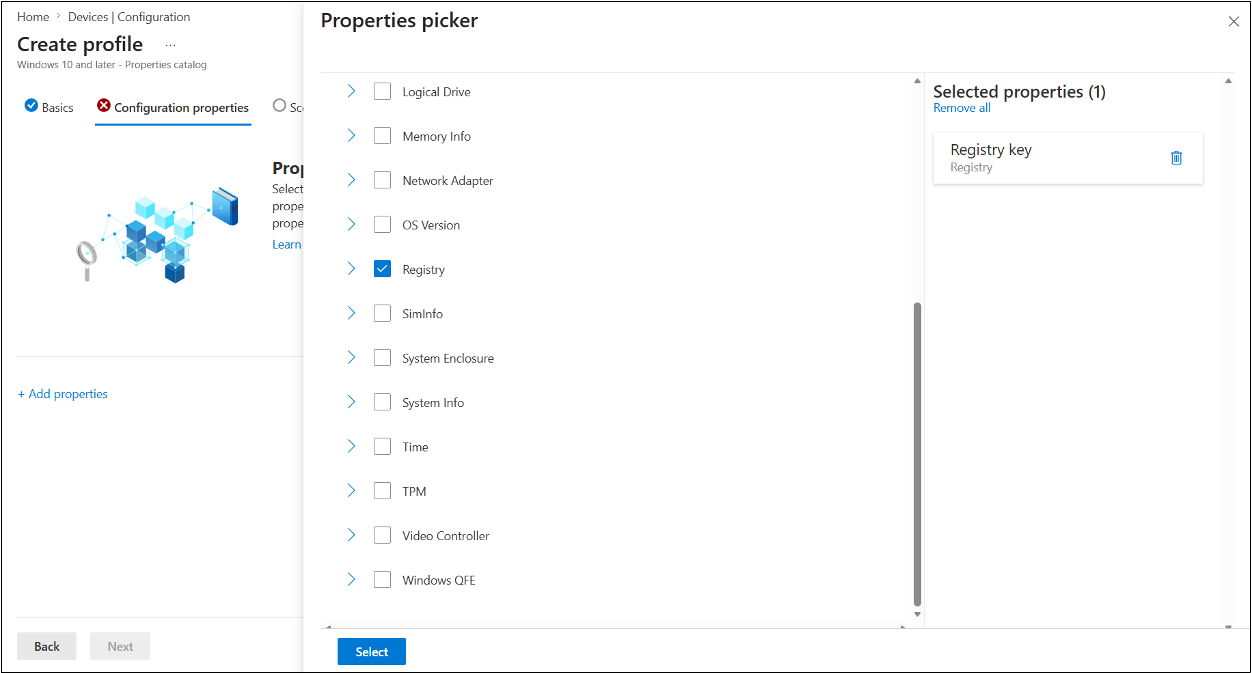
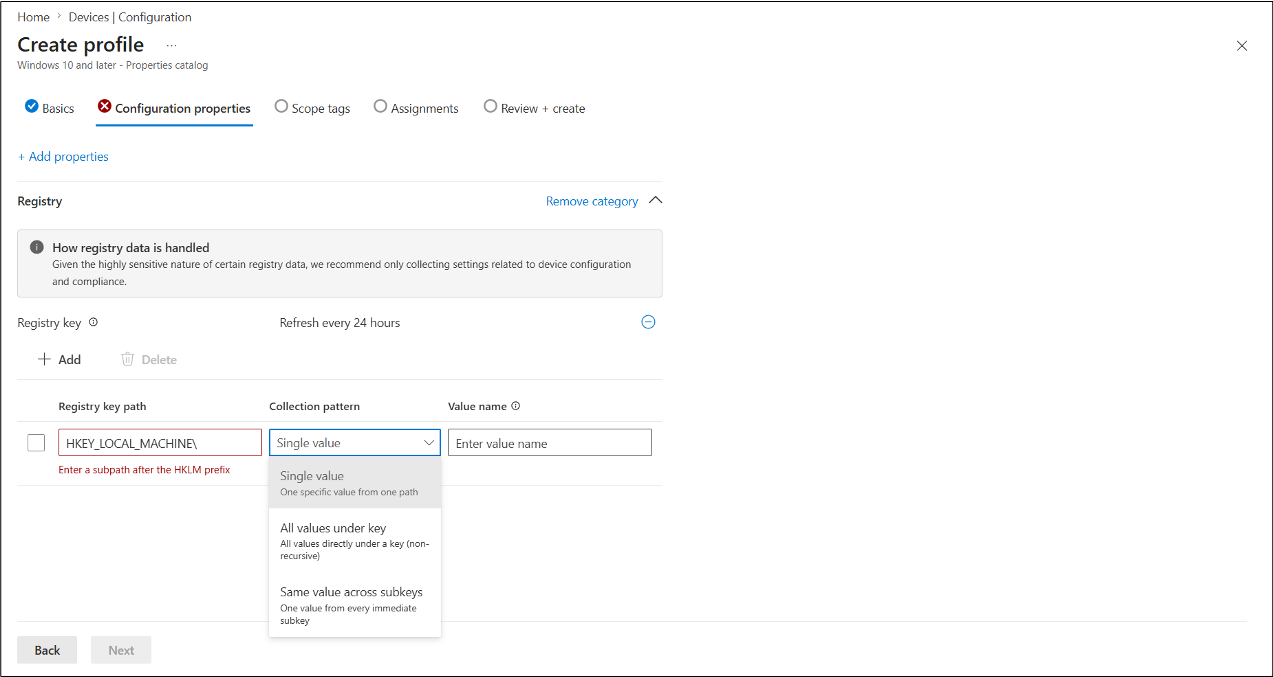
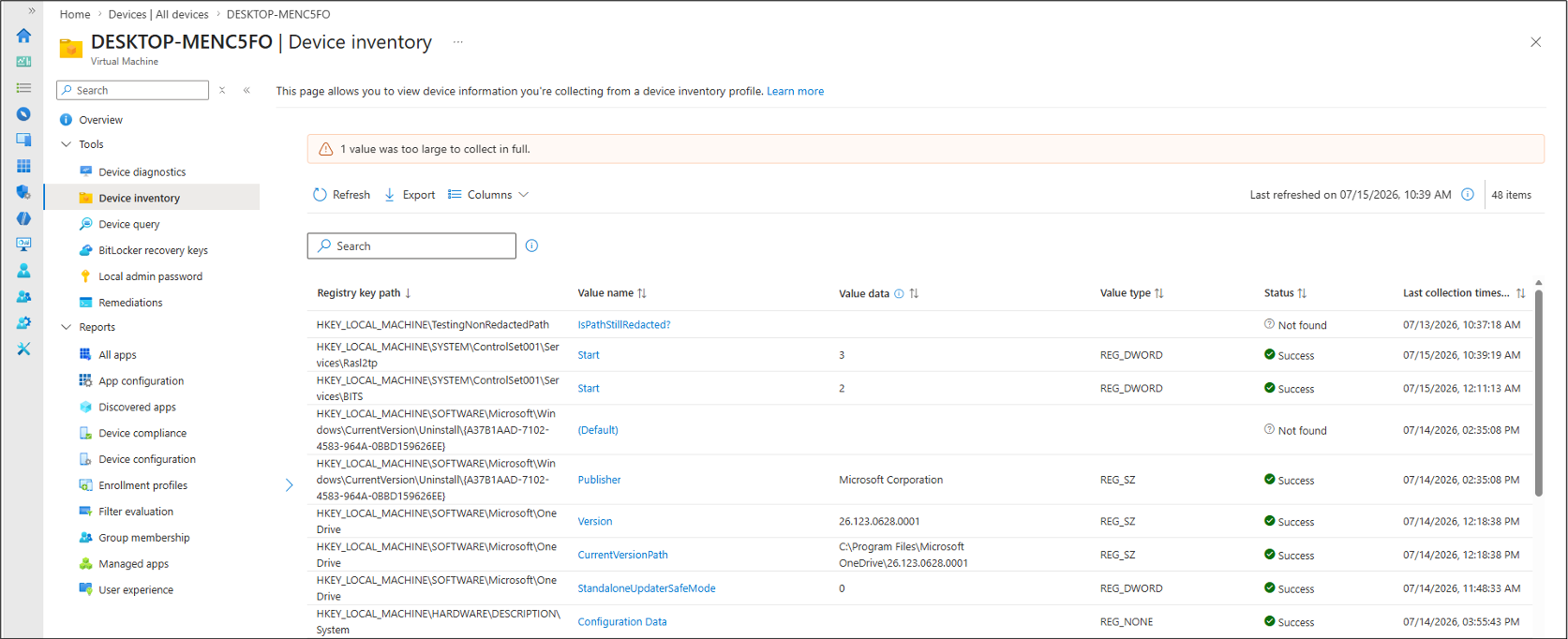
Microsoft's July 2026 (2607) Intune release introduces Registry Inventory, a new capability that enables IT administrators to collect and query Windows registry data directly from the Intune properties catalog, without creating or maintaining custom PowerShell discovery or remediation scripts. Administrators can define specific registry keys or values to monitor, and Intune automatically collects and displays details such as the key path, value name, type, and data in Device Inventory.
The feature supports common collection scenarios including single values, all values within a registry path, and identical values across multiple subkeys, while focusing exclusively on HKLM (device-level) registry settings. Microsoft positions this as a simpler way to validate configuration compliance, troubleshoot device issues, confirm policy application, and compare system configurations across endpoints. Included with Intune Plan 1, the feature also includes safeguards that prevent the collection of potentially sensitive data, such as credentials, tokens, certificates, and connection strings, helping organizations gain better visibility into Windows device configurations while maintaining security and service performance.
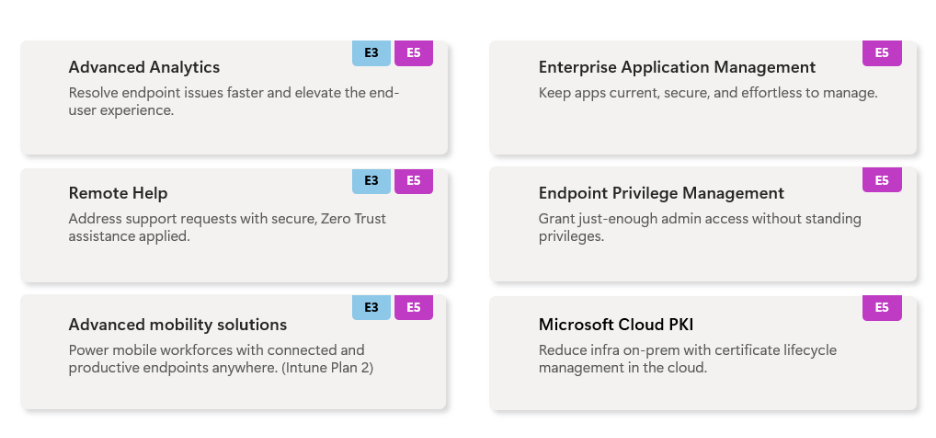
Microsoft announced that, effective July 1, 2026, advanced Microsoft Intune capabilities previously sold through the Intune Suite are now included in Microsoft 365 E5, with selected capabilities also available in Microsoft 365 E3, making enterprise-grade endpoint management more broadly accessible.
The announcement focuses on how organizations can strengthen Zero Trust security by reducing local administrator privileges with Endpoint Privilege Management (EPM), modernizing certificate management with Cloud PKI, and improving IT efficiency through Remote Help, Advanced Analytics, Enterprise Application Management, and enhanced mobile device management, while also leveraging AI-powered capabilities through Microsoft Security Copilot in Intune. Microsoft highlights customer examples including Hino Motors, SOCAR Türkiye, Krones AG, Lindex, Carlsberg, and PepsiCo to demonstrate improved security, faster troubleshooting, simplified application deployment, and AI-assisted endpoint operations. The overall message is that Intune is evolving into a unified platform that combines endpoint management, security, compliance, and AI governance, helping organizations better secure devices, empower IT teams, and prepare for AI-driven operations.
Microsoft is updating Microsoft 365 profile cards so that 11 existing profile properties will be visible by default whenever those fields contain data. Previously, these attributes could be populated from Microsoft Entra ID, Microsoft 365 Organizational Data, or Microsoft Entra People Graph connectors, but administrators had to manually enable them before they appeared on profile cards. The change is intended to make employee and organizational information easier to discover across Microsoft 365 while reducing administrative effort for commonly used profile attributes.
The affected properties include Division, Role, Employee Number, Employee Type, Cost Center, User Principal Name (UPN), Alias, Fax, Street Address, State, and Postal Code. No changes will be made to the underlying data or source systems, and only properties that contain values will be displayed. The rollout is scheduled to begin and complete in late August 2026 across Worldwide, GCC, GCC High, and DoD environments. Organizations that have never configured profile card settings will automatically receive the new default behavior. While Microsoft is enabling visibility by default, administrators will retain control over which attributes are displayed and can continue managing profile card settings through the Microsoft 365 admin center or Microsoft Graph.
For Global Administrators and People Administrators, the primary consideration is governance and privacy. Organizations should review which of the affected attributes contain data and determine whether any should remain hidden from users. Microsoft recommends reviewing current profile card configurations and using Microsoft Graph to hide unwanted properties before August 24, 2026. Help desk and support teams should also be informed of the upcoming change so they can address any user questions related to newly visible profile information. After rollout, administrators can manage profile card visibility through the Microsoft 365 admin center under People Settings > Profile cards. Changes may take up to 24 hours to take effect.
Microsoft is introducing a new OneDrive capability that allows administrators to exclude specific folders from synchronization, helping organizations prevent device-specific or development-related content from being uploaded to OneDrive. Examples include folders such as node_modules, PowerShell module directories, Visual Studio configuration folders, and other development tooling locations that typically do not need cloud storage or cross-device access. General availability is scheduled to begin in mid-August 2026 and complete by late August 2026.
This is primarily an administrative and governance-focused enhancement. Organizations using OneDrive on Windows and Mac can configure folder names or path patterns through Group Policy so that matching folders remain on the local device and are excluded from synchronization. The feature is off by default, and no changes will occur unless administrators choose to configure exclusion rules.
There are a few important limitations to understand. Existing folders that are syncing before a rule is applied will continue syncing until users move them out of OneDrive and back into a synchronized location. In addition, moving files that are already syncing into an excluded folder is not currently supported. OneDrive must also be restarted after policy changes for updated rules to take effect.
For organizations with development teams, scripting environments, or applications that generate large volumes of machine-specific files, this update could help reduce unnecessary cloud storage consumption and improve sync manageability. Administrators considering the feature should review local-only folders that may benefit from exclusion, test policies with a pilot group, update user guidance, and prepare support teams for the new behavior. Organizations that do not plan to use the feature do not need to take any action, as OneDrive sync behavior will remain unchanged unless exclusion policies are configured.