At the end of June 2026, Microsoft added the ability for users with M365 Copilot Premium license to set up and use brand kits when creating PowerPoint decks with Copilot. Users will be able to "select brand" in the Copilot menu to ensure consistent use of colors, fonts and organizational visual identity in AI-generated slides. A brand template will need to be created first for copilot to apply to new slides and presentations.
In Power BI, Copilot helps you use the transformational power of generative AI to get the most from your data. It provides chat-based experiences where Copilot can help you with tasks from on-the-fly analysis for business users to data analysis expression (DAX) generation for advanced creators. The product also includes various AI-infused Copilot features.
Copilot in Power BI offers a range of capabilities designed to enhance productivity and streamline workflows for business users, report authors, and data model owners. These features use AI to simplify complex tasks, provide actionable insights, and improve the overall data experience.
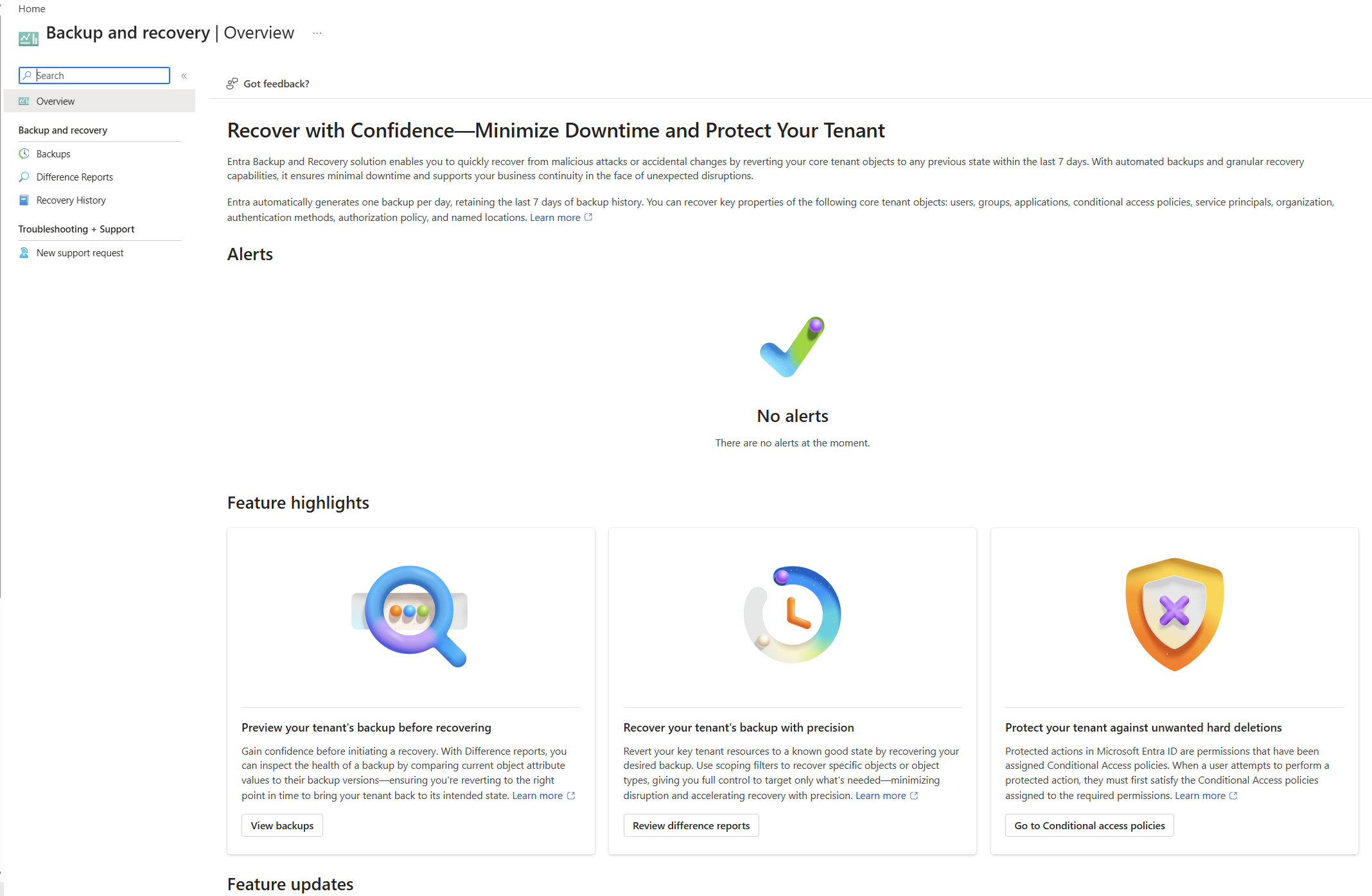
Microsoft Entra Backup and Recovery is now generally available for customers with Entra ID P1 or P2 licenses, providing a built-in way to automatically back up and restore critical identity and directory objects. This includes users, groups, applications, managed identities, and Conditional Access policies after accidental or malicious changes. The service now offers seven days of retention, enhanced snapshot and difference reporting capabilities, and supports a broader tenant recoverability strategy that combines backup, governance, operational readiness, and least-privilege controls. Microsoft emphasizes that effective recoverability goes beyond restoring objects, requiring organizations to maintain known-good configurations, monitor for configuration drift, and practice recovery processes. The article illustrates this with a Contoso scenario in which backup, audit logs, and governance monitoring help quickly identify and reverse a Conditional Access misconfiguration that disrupted user access, demonstrating how a layered identity resilience approach can reduce downtime and improve recovery confidence.
Microsoft 365 Copilot Planner Agent is going to reach General Availability (worldwide) by the end of June 2026. Users with an active Microsoft 365 Copilot license will be able to access the Planner Agent to create and manage tasks, answer questions about work, take action on plans and tasks right in Copilot, and generate plans and reports. Example Planner Agent prompts:
* “Generate an executive summary for this plan with status, highlights, and action items.”
* “What tasks are overdue across all plans?”
* “Add a new task for ‘Finalize governance policy’ and assign it to me.”
Users can add the Planner agent from the Copilot agent store. Admins cannot limit the availability of this agent to specific groups, only for the entire tenant, and can manage this agent as part of Copilot through the Microsoft 365 Admin Center.
Microsoft is rolling out a new feature in Power Automate, which is Microsoft's tool for building automated workflows. One feature of Power Automate lets people build "desktop flows" - automations that interact directly with programs on a computer, like clicking buttons or filling in forms automatically. There's a built-in checker that scans these desktop flows for problems or rule violations, similar to a spell-checker but for automation quality and compliance. Up until now, that checker just flagged issues when someone looked at a flow directly. The new update lets an IT administrator set up alerts tied to that checker, so instead of having to check on flows manually, they can get notified automatically when a violation is detected somewhere across an organization's automations. Admins will be able to choose which types of violations should trigger an alert and adjust settings for each type of notification. This feature is set to be fully rolled out by June 30, 2026. It is noted that this is just an informational update - nobody needs to do anything to prepare for it or turn it on manually, it's simply a new capability becoming available.
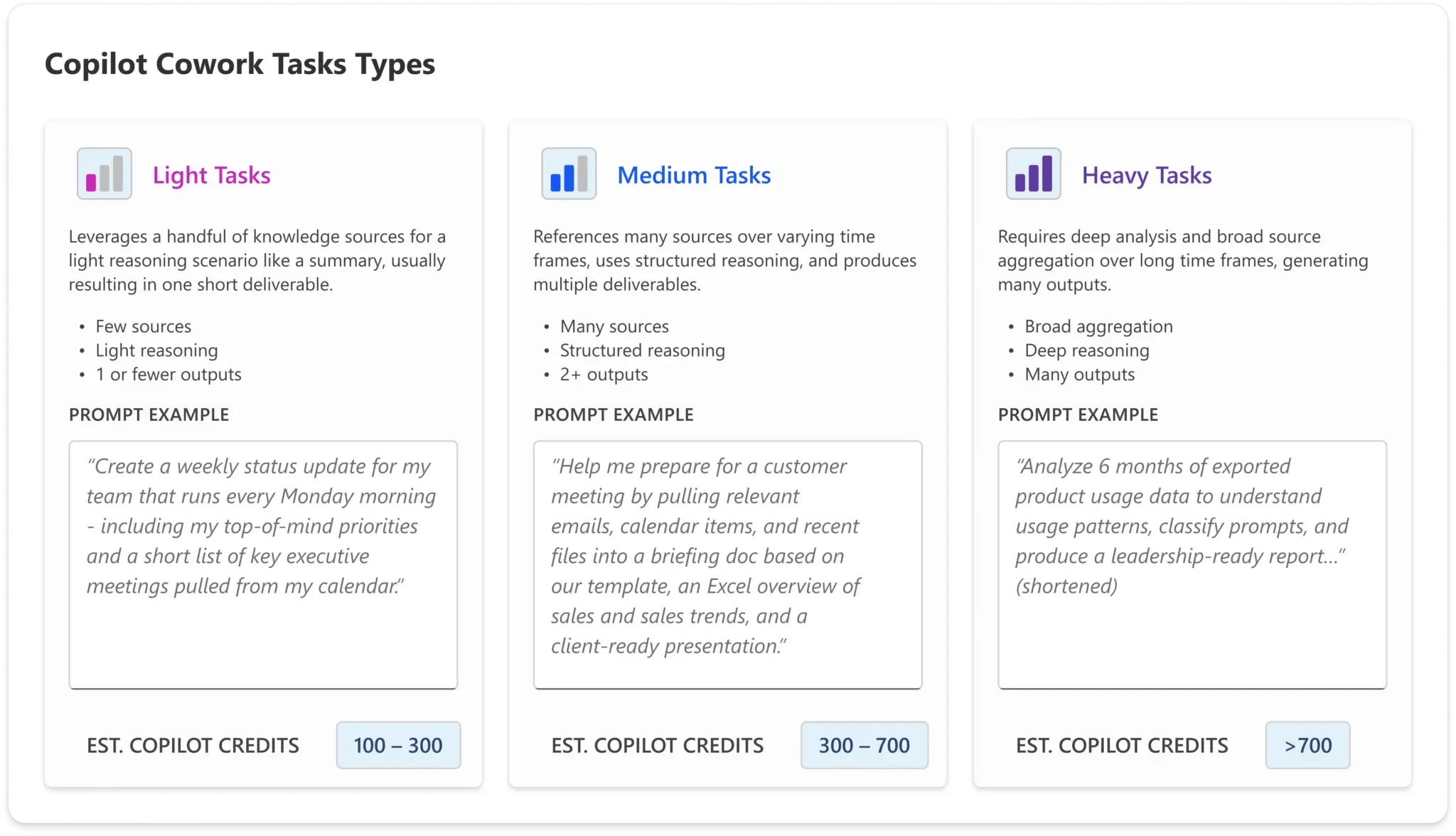
Microsoft has announced the general availability of Copilot Cowork, positioning it as an “agentic” AI experience that can execute multi-step work across Microsoft 365 on a user’s behalf. Unlike traditional Copilot interactions that focus on drafting or summarizing, Cowork is designed to take action. It can send emails, schedule meetings, create documents, and manage tasks across Outlook, Teams, SharePoint, and other services, with users approving actions as they occur.
With this GA release, Microsoft is also introducing several expanded capabilities, including model selection, image generation, browser-based task execution, and a centralized customization experience for plugins and skills. More importantly for IT leaders, Cowork now operates on consumption-based billing, with usage visibility and controls available through the Microsoft 365 admin center.
From an administrative and business perspective, the shift to usage-based billing is the most significant aspect of this update. Organizations that participated in early access or the Microsoft Frontier program may already have users relying heavily on Cowork for day-to-day work. Without clear governance, training, and usage monitoring, this type of agent-driven automation can quickly translate into higher-than-expected costs. This is especially relevant as Microsoft begins consolidating usage-based billing across AI services, meaning Cowork usage may draw from the same pool of credits used by other solutions such as Syntex or AI Builder. While not explicitly detailed in the announcement, this broader trend should be on every admin’s radar when planning AI adoption strategies.
There is also a practical adoption challenge emerging. Because Cowork can perform complex, multi-step actions, inefficient prompting or overuse can compound consumption costs. As a result, many organizations are likely to revisit token optimization and AI usage best practices that may have been overlooked during early Copilot rollouts.
For IT admins and leadership teams, now is the time to treat Cowork as both a productivity accelerator and a governance concern. At a minimum, organizations should review billing configurations, set appropriate usage limits, evaluate plugin and model access, and invest in end-user training that emphasizes efficient and intentional use. Without these guardrails in place, the operational benefits of Cowork could be offset by cost overruns and lack of visibility into how AI is being used across the tenant.
If your organization is moving forward with Copilot Cowork, ensuring the right balance of enablement, governance, and cost management will be critical to realizing its value without introducing unnecessary risk. If you're still working through where to begin, partnering with an experienced Copilot enablement provider like AdaptivEdge can help bring structure to adoption and ensure users are set up for efficient, effective use as these changes roll out.
Previously, deleted Power Automate flows could only be restored by Microsoft customer service. Starting Jun 1, 2026, the feature will be available in public preview. Users will be able to restore flows for 21 days after deletion by using the Power Automate Management Connector (to be used in a Power Automate flow to restore the workflow) or PowerShell cmdlets for Power Apps.